Enhance the transfer of learning and engagement in organizational development
Discover how to enhance learning transfer and engagement in organizational development with interactive exercises that foster meaningful...
.png)
Every organization wants to develop the potential of their people, teams, and leaders to work better together. Yet in many workplaces, learning still feels like a one-time event—powerful in the moment but quickly forgotten once people return to their day-to-day roles.
According to McKinsey’s Development in the Future of Work report, learning is closer to daily work than ever, but it still isn’t fully embedded. Employees increasingly want development that intuitively flows into their work, helping them continually grow and adapt their behavior with confidence to thrive in a fast-changing world.
That’s why over 1 million people, teams, and leaders have downloaded the Lumina Splash app to bring out the best in their performance with highly engaging learning experiences that keep their development going in the workplace.
Here are three reasons why over 40,000 teams and leaders access it monthly for ongoing development and four ways organizations can use it to enhance coaching and development sessions.
Most psychometric journeys end once the report is read. The Lumina Splash app changes that. Through a personalized journey that animates people’s personalities, the app transforms the accurate, personalized behavioral data from Lumina Spark into interactive experiences that help teams and leaders intuitively connect the dots between the impact and perception of behavior.
By putting personality into the palm of people’s hands, the interactive visuals create memorable familiarity with core concepts from the Lumina Spark Portrait like the Splash, the Eight Aspects, and the Three Personas, helping embed a common language for understanding behavior together.
One of the app’s most popular functions is bringing Portraits together to compare personalities, so teams can understand each other’s behavioral style and explore how to work better together.
With the Lumina Splash app, I can go through people’s personality aspects and show them how we can work better together. And that really gets people interested.
– Christopher Allen, Chief Change Officer, MONTROC Consulting
The first few minutes of a development workshop set the tone for everything that follows. With easy-to-deliver icebreakers and bite-size exercises that go deeper, the Lumina Splash app helps create instant curiosity around behavior and starts meaningful conversations in sessions sooner.
Whether you’re supporting organizations with communication strategies, giving and receiving feedback, or building rapport between new teammates, the interactive activities playfully explore different behavioral styles, helping teams and leaders engage naturally and start talking with a common language to connect and understand their behavior together.
The best part is when people get a chance to scan each other’s Splashes. Even if you ask them to compare their personality style with only one other person in the room, they go and compare it with everybody. People love it.
– Danny Wareham, Director and Lead Psychologist, Firgun
As McKinsey highlights, sustaining the impact of learning sessions is becoming increasingly important for long-lasting employee development. With the Lumina Splash app, teams and leaders have a go-to space to continuously reflect on their strengths, areas for development, and opportunities to adapt whenever they want.
Encouraging ongoing self-awareness, people can build the habit of regularly reflecting on the effectiveness of their behavior and how it impacts those around them. With instant, practical guidance on how to connect with different styles in the people they work with, teams can apply their learning and keep growing beyond sessions.
These three reasons show why people, teams, and leaders keep returning to the Lumina Splash app as their go-to space for reflection, development, and growth in sessions and back at work. What truly brings these reasons to life are the practical, interactive features that help learning stick long after the session ends.
.png?width=956&height=500&name=Lumina%20Splash%20app%20features%20(2).png)
Before exploring how teams and leaders use the Lumina Splash app, here’s a quick look at the four interactive features that bring behavior to life in learning sessions and beyond:
This straightforward yet impactful feature provides teams and leaders with an animated visual of their personality, called their Splash, to interactively explore during learning sessions and beyond. Through a personalized, self-guided journey, they can easily identify development opportunities to adapt their behavior more effectively in their roles and relationships.
Combined with a Lumina Spark Portrait, people can see how their behavior shifts depending on different contexts across their Three Personas, helping them recognize when their strengths may become overextended under pressure and uncover the hidden potential within their Underlying Qualities.
Accessible anytime, View your Splash not only deepens self-awareness during sessions but encourages continuous reflection back at people’s desks.
The Share and Compare feature brings people together in coaching and development sessions by overlaying their similarities and differences. With an intuitive map showing where their personalities might connect or clash, teams and leaders can quickly pinpoint how they can work better together.
Like with View your Splash, scanned in Splashes from people’s Lumina Spark Portraits allow people to compare similarities and differences in how their behavior changes depending on context across the Three Personas. This helps teams better understand each other’s underlying preferences, what they dial up and down in their everyday behavior, and their overextensions.
By breaking down assumptions and highlighting how different styles can complement each other, Share and Compare opens conversations with shared clarity, helping everyone value and adapt to each other’s style, and ultimately, work better together.
Designed for qualified Lumina Spark Practitioners, the Create a Taster Splash feature offers a quick way to introduce people to the potential of self-awareness. With a simple two-minute questionnaire that visualizes a high-level view of someone’s personality, Practitioners can easily open conversations around anyone’s potential strengths, development areas, and how others might perceive their style.
Used as a warm-up before sessions, Create a Taster Splash helps practitioners build curiosity and influence around the value of self-awareness through a practical lens for recognizing behavior, setting the stage for deeper development with Lumina Spark.
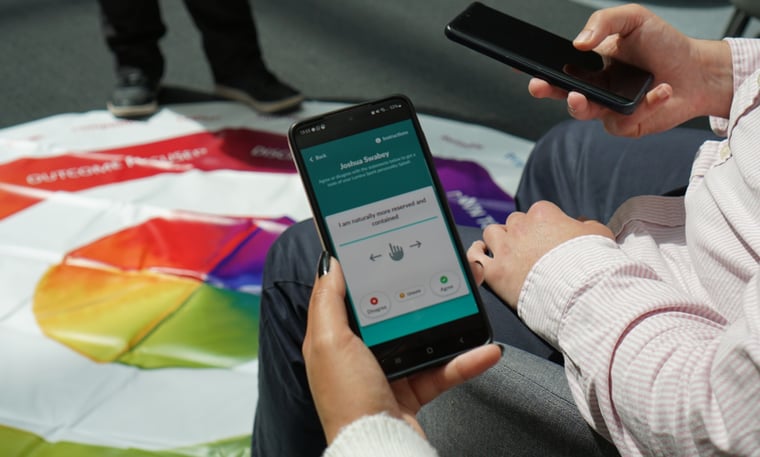
Exclusively for talent professionals, facilitators, and leaders qualified in Lumina Spark, the Draw a Custom Splash feature illustrates an imaginative picture of someone’s personality to explore behavior, in just a few taps. .
Using sliders, you can set behavioral scores to visualize any combination of personality aspects, instantly creating a new Splash to share in learning sessions. It’s an engaging way to build personalized scenarios around any particular behavioral themes or dynamics for teams and leaders to explore.
In coaching or team development sessions, whether it’s exploring opposite styles, highlighting overextensions, or showing how to adapt in different situations, Draw a Custom Splash helps keep conversations interactive and visually focused on key learning points.
Development doesn’t have to stop once sessions end. With the Lumina Splash app, organizations can bring highly engaging learning experiences into development sessions that flow naturally into everyday work, helping teams and leaders continuously adapt, connect, and thrive together.
Create a Taster Splash for yourself to experience psychometrics done differently. Download the Lumina Splash app from the Google Play Store or App Store now.
Discover how to enhance learning transfer and engagement in organizational development with interactive exercises that foster meaningful...
Discover three practical strategies to enhance teamwork using the Lumina Splash app’s Share and Compare feature, fostering better communication and...
Discover how to integrate soft-skills development into daily work using the Lumina Splash app, fostering lasting behavior change in modern workplaces.